Configuring Integrations
You can add an AI Agent to specific portals.
To integrate AI Agent with your portal:
-
In the Navigation Menu, browse to Publishing >Themes.
-
On the Themes page, navigate to the Custom Themes section and click the Edit button next to the theme you want to customize.
-
In the Themes workspace, navigate to the Global > Integration > AI Agent and click the Expand button.
-
In the expanded menu, click the Add AI Agent button and provide the following information:
-
Portal Name: From the dropdown, select the portal where you want to display your AI Agent.
-
Agent ID: Enter the AI Agent ID for the agent you want to embed in the selected portal. The AI Agent ID is available in the HTML code generated after configuring the AI Agent. In the AI Agent Console, select the required AI Agent, navigate to Personalize and Publish > Embed, locate the
data-agent-idattribute in the HTML code, copy its value, and paste it here.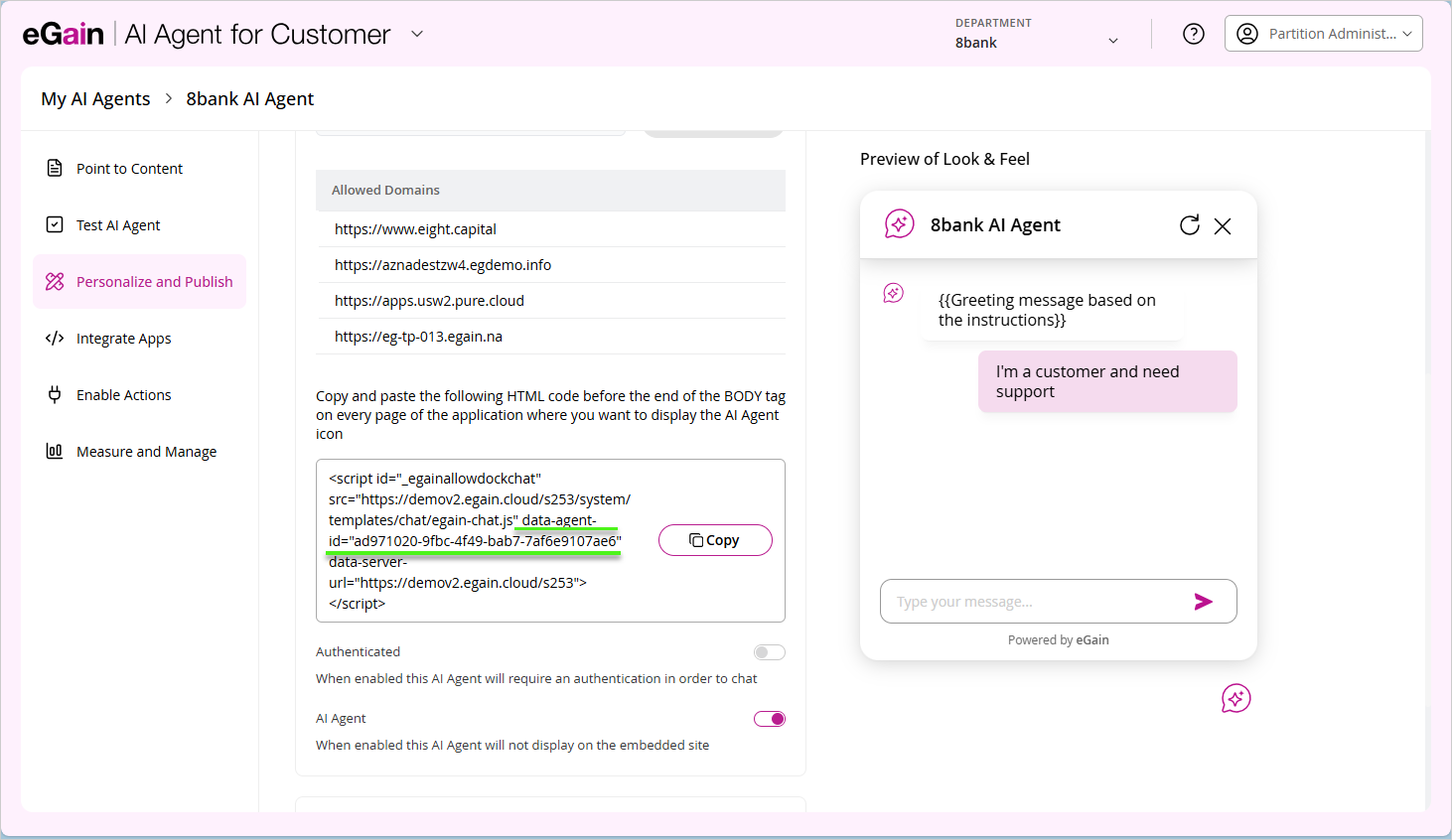
-
-
You can also add the AI Agents for other portals and click the Edit button to edit your integrations.
-
Click Save.