Agent Login Summary
Report on the number of times that agents logged in and the amount of time spent logged in. This includes a breakdown of the reasons for logging out (explicit or timeout), and the time spent unavailable or unavailable for chat and email. It is also possible to see the agent’s inactive time (i.e. the time for which they were not seemingly working on any activity).
There are versions of this report for each of the historical time intervals, which break down the data by agent & interval. This report uses an Agent parameter set. It may be found under the following path: Root > Reports > OmniChannel Reports > {interval}.
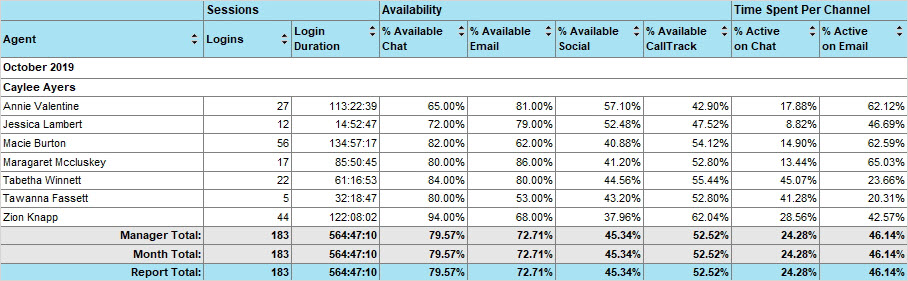
The report is based on the Agent Session Summary model and includes the following columns.
Agent
The agent who was logged in.
Manager
The manager of the agent who was logged in.
Logins
The number of times an agent logged in during the report interval.
Login Duration
The amount of time that an agent spent logged in during the report interval.
% Available Chats
The amount of time that an agent spent available for chat during the interval, expressed as a percentage of the agent's login duration during the interval. This means they are marked as available. This does not consider whether they are at their max load.
% Available Email
The amount of time that an agent spent available for email during the interval, expressed as a percentage of the agent's login duration during the interval. This means they are marked as available. This does not consider whether they are at their max load.
% Available Social
The amount of time that an agent spent available for social during the interval, expressed as a percentage of the agent's login duration during the interval. This means they are logged in and marked as available. This does not consider whether they are at their max load
% Available CallTrack
The amount of time that an agent spent available for calls/CallTrack activities during the interval, expressed as a percentage of the agent's login duration during the interval. This means they are logged in and marked as available. This does not consider whether they are at their max load.
% Active on Chat
The amount of time that an agent spent working on chats during the interval, expressed as a percentage of the agent's login duration during the interval. An agent is considered to be working on a chat while it is in focus in their inbox, whether or not they are physically typing or clicking. This includes work time and wrap time
% Active on Email
The total amount of time that an agent spent working on emails during the interval, expressed as a percentage of the agent's login duration during the interval. An agent is considered to be working on an email while it is in focus in their inbox, whether or not they are physically typing or clicking.
% Active on Social
The total amount of time that an agent spent working on social activities during the interval, expressed as a percentage of the agent's login duration during the interval. An agent is considered to be working on an activity while it is in focus in their inbox, whether or not they are physically typing or clicking.
% Active on CallTrack
The total amount of time that an agent spent working on CallTrack activities during the interval, expressed as a percentage of the agent's login duration during the interval. An agent is considered to be working on an activity while it is in focus in their inbox, whether or not they are physically typing or clicking
% Active on Task
The total amount of time that an agent spent working on task activities during the interval, expressed as a percentage of the agent's login duration during the interval. An agent is considered to be working on an activity while it is in focus in their inbox, whether or not they are physically typing or clicking.
% Inactive
The amount of time that an agent spent logged in but not working on any activities during the interval, expressed as a percentage of the agent's login duration during the interval. This either means that the agent had no activities assigned or they did not have an activity in focus in their inbox during this time.
Logouts
The number of times an agent logged out during the report interval, by explicitly clicking the ‘Log Out’ button.
Idle Timeouts
The number of times an agent was automatically logged out (timed out) during the report interval because of inactivity.
System Timeouts
The number of times an agent was automatically logged out by the system during the interval, for
some reason other than inactivity.
Login Duration on Logout
(Intra-day report only)
At the time of an agent logging out (or being logged out), the total amount of time that they had spent logged in. Irrespective of how long the agent was logged in for, this amount of time is counted entirely against the report interval in which the agent logged out (or was logged out).