Chat Agent Monitor
Monitor the real-time status of each agent, including whether they are available for chat, the volume of open chats and the age of the oldest open chats. This report uses an Agent parameter set. It may be found under the following path: Root > Reports > Chat Reports > Real-time.
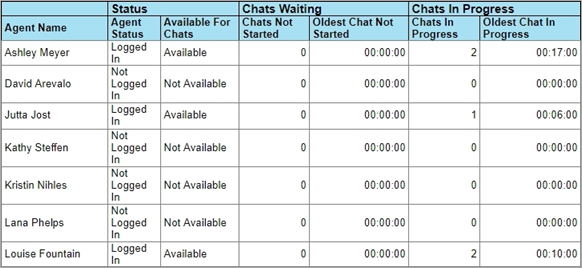
The report is based on the User Monitor model and includes the following columns.
Agent Name
The agent being monitored.
Agent Status
The current status of the agent indicating whether they are logged in or logged out. Also indicates if the user account has been disabled by an administrator, which prevents the agent from logging in.
Available For Chats
Indicates whether the agent is currently available for chat. This means they are marked as available and does not take into account whether they are at their max load.
Chats Not Started
The number of open chats currently assigned to the agent, which the agent has not yet clicked.
Oldest Chat Not Started
The age of the oldest open chat currently assigned to the agent, which the agent has not yet clicked. Age is counted from the time of the chat being initiated.
Chats In Progress
The number of open chats currently assigned to the agent, which the agent has clicked at least once.
Oldest Chat In Progress
The age of the oldest open chat currently assigned to the agent, which the agent has clicked at least once. Age is counted from the time of the chat being initiated.
If a resource is being shown in the report with all unpopulated or zero values, this may indicate that the resource has not been enabled for real-time monitoring. For more information, see About Real-time Digital Reports.