WSS Performance Dashboard
The WSS Performance dashboard allows analysis of Web Self-Service and Guided Help volume and effectiveness metrics including session and search success, escalation avoidance and article ratings over the course of 3 months.
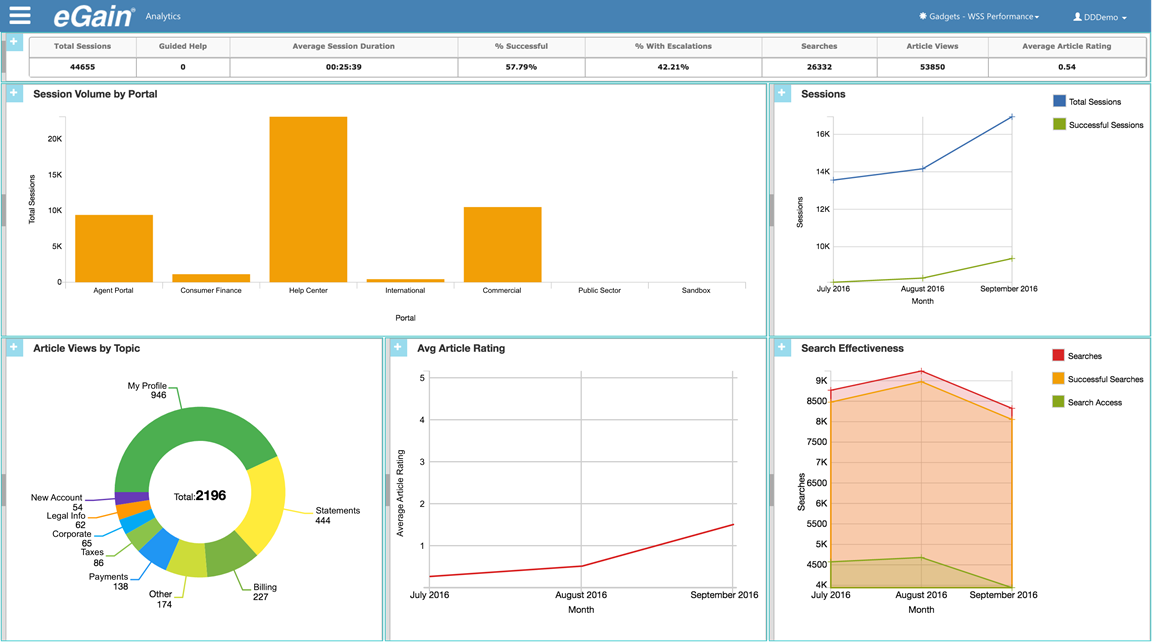
The following KPIs are presented at the top of the dashboard, aggregated for all Knowledge Portals that the user has permission to see across the 3-month period.
- Total Sessions: The total number of Web Self-Service sessions.
- Guided Help: The total number of guided help sessions.
- Average Session Duration: The average duration of a session.
- % Successful: Sessions that did not result in an escalation. An escalation is when a user initiates and completes an escalation attempt, for example clicking a Contact Us link, completing an email form, and pressing Send.
- % With Escalations: The percentage of sessions where an escalation occurred.
- Searches: The number of times search was used.
- Article Views: The number of times articles were viewed during sessions.
- Average Article Rating: The average rating given by customers for articles that were rated during sessions.
The following charts and reports are included in this dashboard.
|
Chart/Report |
Parameter |
Chart Type |
Description |
|---|---|---|---|
|
Session Volume |
Portal |
Line |
The total volume of sessions and guided helps during the period. Shows the trend at which self-service is being adopted by users and the relative success rate for sessions without escalations. |
|
Search Effectiveness |
Portal |
Area |
The number of successful searches that resulted in an article being accessed across all portals that the user has permission to see. This chart indicates how easily articles can be found using search. For example, a large delta between successful searches and search access would suggest that the articles being returned by search are not viewed as relevant by the end user. |
|
Escalations |
Portal |
Area |
The number of escalations that were attempted and averted across all portals the user has permission to see. Often a user is presented with additional self-service options when they attempt to escalate by clicking a Contact Us link. If a user does not complete an attempted escalation it is assumed to be averted. If the number of escalations averted is trending up or abnormally high it can indicate that additional content or self-service options are needed to increase contact deflection. |
|
Article Views By Topic |
Portal |
Pie |
A pie chart showing the number of article views by topic. This chart gives an indication of which topics are popular over the last 3 months. This can provide a general insight into what is driving customers to self-service. |
|
Average Article |
Portal |
Line |
The overall trend for article ratings for all portals that the user can see over the last 3 months. A declining trend can indicate the newly introduced content has issues or that existing content has become out dated or inaccurate. |