Customizing the Footer
You can configure the layout of the footer and also add external footer URLs.
To customize the footer:
-
In the Navigation Menu, browse to Publishing >Themes.
-
On the Themes page, navigate to the Custom Themes section and click the Edit button next to the theme you want to customize.
-
In the Themes workspace, navigate to Global > Footer and click the Expand button.
-
From the expanded menu, you can make the following changes:
-
Footer background color: From the color picker, select the footer background color for the dark & light modes.
-
Footer text color: From the color picker, select the footer text color for the dark & light modes.
-
Footer Style: Select and configure one of the available footer styles :
-
Horizontal List: Select this style to display the links in a horizontal list. To view the Quick Links label, enable the Show Quick Links Label setting. Click the Add button to select the links that you want to display in the footer from the list of available options. From the Selected Links list, you can click the Delete button to remove any link.
-
Multi-Column: Click the Add button to add a new column. You can add up to 4 columns.
-
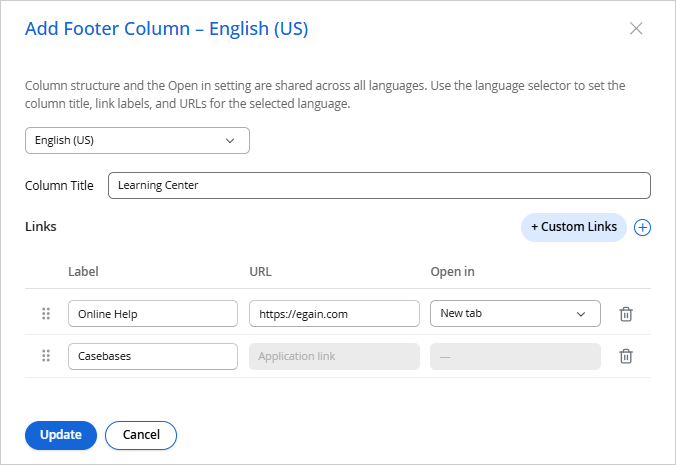
In the Add Footer Column modal, select a language from the dropdown at the top of the modal. This dropdown lists the languages selected in Branding & Identity > Languages. For more information, see Configuring Languages.
-
Enter a Column Title for the selected language.
-
Click the + Custom Links button to add a link. Provide a Label and the URL, and select whether it opens in the same tab or a new tab.
-
Use the drag handle next to a link to rearrange it, or click the Delete
 button to remove one.
 -
You can also click the Add button to add one of the available links, for example, All Topics, Announcements, Bookmarks, and so on. Click Update to save your changes, or Cancel to discard them.
-
-
External Component: Select this option, then click the Edit
 button to open the Add External Footer Component modal.
-
Select a language from the dropdown at the top of the modal.
-
Enter the External Footer Component URL for the selected language.
-
Click Update to save your changes, or Cancel to discard them.
-
-
- Show Disclaimer: Enable this setting to enter the Disclaimer Text which appears below the footer. This is only available for the Horizontal List and Multi-Column list footer types. You can also include links using html tags in the following format: <a href="website_link" target="_blank">display_text</a>
-
-
Click Save.