Customizing the Suggestions Page
You can control the appearance and functionality of certain elements on the suggestions page . The changes that you make can be viewed simultaneously while making these changes.
To customize the suggestions page:
-
In the Navigation Menu, browse to Publishing >Themes.
-
On the Themes page, navigate to the Custom Themes section and click the Edit button next to the theme you want to customize.
-
In the Themes workspace, navigate to Pages > Suggestions.
-
Make the following selections:
-
New Article Suggestion: Select the fields that you wish to display in the My Suggestions modal. Please note that Title & Content are mandatory fields and cannot be deselected.
-
Article Feedback: Select the fields that you wish to display on the Article Feedback modal which opens when you provide negative feedback to an existing article. Please note that Title & Content are mandatory fields and cannot be deselected.
-
Form Fields: Select the input types for the title and description fields in the suggestions form. You can choose Text, which allows users to enter free-form text, or Dropdown, which lets you define a set of options for users to select when creating suggestions on the portal.
-
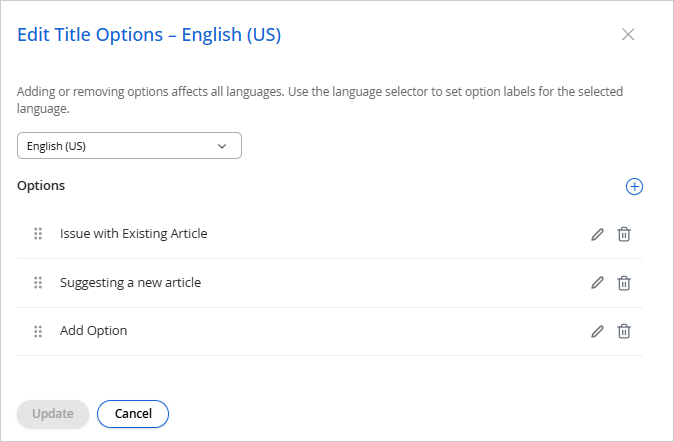
If you select Dropdown for the Title Input Type or the Description Input Type, click the Edit
 button next to Options to open the Add Title Options or Add Description Options modal.
 -
Adding or removing options affects all languages. Use the language selector at the top of the modal to set the option labels for the selected language.
-
Select a language from the dropdown at the top of the modal to set option labels for that language. This dropdown lists the languages selected in Branding & Identity > Languages. For more information, see Configuring Languages.
-
Click the Add
 button next to Options to add an option, and enter the option label for the selected language. Repeat for each additional option you want to add. Options you add here apply across all languages; only the labels change per language.
 -
Click Update to save your changes, or Cancel to discard them.
-
-
-
Click Save.